Showing posts with label 3d. Show all posts

2012-11-23

3 useful cones, part 2

Related the post "3 useful cones" (part 1). When unrolled, these cones make up 1/4, 2/4 and 3/4 of a circle.
If you look closely, you can see all the lines/squares line up perfectly...

2011-11-17

Experiments by Joe Magri


Joe Magri is making some really nice plywood models to investigate bending geometry. In his own words: "Through a series of analogue experiments I have been applying several patterns to plywood to explore the deformation of the material to create a potential sculpture or pavilion. The cuts are to allow for bending and openings to occur."

2011-08-22

Hinge Force in Kangaroo


The new Hinge Force in Kangaroo is perfect for simulating bent developable surfaces!

In these examples, Kangaroo wants to flatten the meshes by trying to set the angle between each neighbouring triangles to zero. Springs make sure the surfaces don't deform. Thanks to Daniel Piker for this great force! More reading about the Hinge concept here.

2011-04-07

Work by Joel Letkemann


Joel Letkemann made some very nice and thorough studies of plywood bending for his project "New Prosthesis: Bent Wood Exoskeletons". He also studied various methods for assembly and developed some very interesting structural concepts.


Images: Joel Letkemann

2011-02-13

Try the Tapeworm


Some people have shown interest in my Tapeworm script, so I'm posting it here for anyone to try.
There are some notations inside the VB script explaining what is going on.
Basically, the script deals with the surface as if it were a long series of connected planar quads and then outputs the vertices of those flat surfaces as two lists of points. These points can be made into either polylines or interpolated curves, resulting in either a faceted or a smooth surface..

The two most important inputs for the script are "bend" and "twist". They should be lists of values that determine the curvature for each segment and the direction of this curvature. Please note that both lists should be equal in length. Also, the more values (steps), the more accurate the surface will be. The resulting surface should become single-curved (developable) and unroll to a straight strip.
Some photos and videos.
Good luck! Feedback is welcome.

Raw grasshoppers should be eaten with caution, as they may contain tapeworms. http://en.wikipedia.org/wiki/Grasshopper

2011-01-15

Tapeworm script with sliders

MD-slider controlling Bending on Y-axes and twisting (left/right) on X-axes. Surface is Baked to Rhino and then unrolled to become flat and straight. Other versions here:


2010-12-18

Tapeworm script


"Tapeworm" is the working title for a little script I'm developing. It will produce a long thin developable surface that unrolls to a straight strip. The curvature (bending + twisting) is controlled by two lists of values.

2010-12-10

Scripted 3d Bending


Fueled by a question from Jesper Thøger Christensen, I've continued to work on scripted 3d bending, something I started a while ago. At the moment it will just produce a helix (constant bend + constant twist), but I'm hoping to get some more elasticity in there.

2009-11-19

Developable fork


A developable fork is way to connect three developable surfaces with each other. They are joined by a flat triangle, tangent to the three surfaces (and tangent to the three edge curves). The developable fork is very useful when creating volumes from developable surfaces.

Some more images and info here.

2009-05-18

SurfaceTurtle and CurvatureTurtle by Lorenz Lachauer

Lorenz Lachauer has a great blog called eat-a-bug. It has some very interesting topics. I used his Grasshopper file SurfaceTurtle and Rhino plugin TwistedBeams to generate these plank lines from an ellipsoid:

(The SurfaceTurtle works just like the ToyCar plugin by David Rutten).
I also used his Grasshopper file CurvatureTurtle to generate some elastica curves:
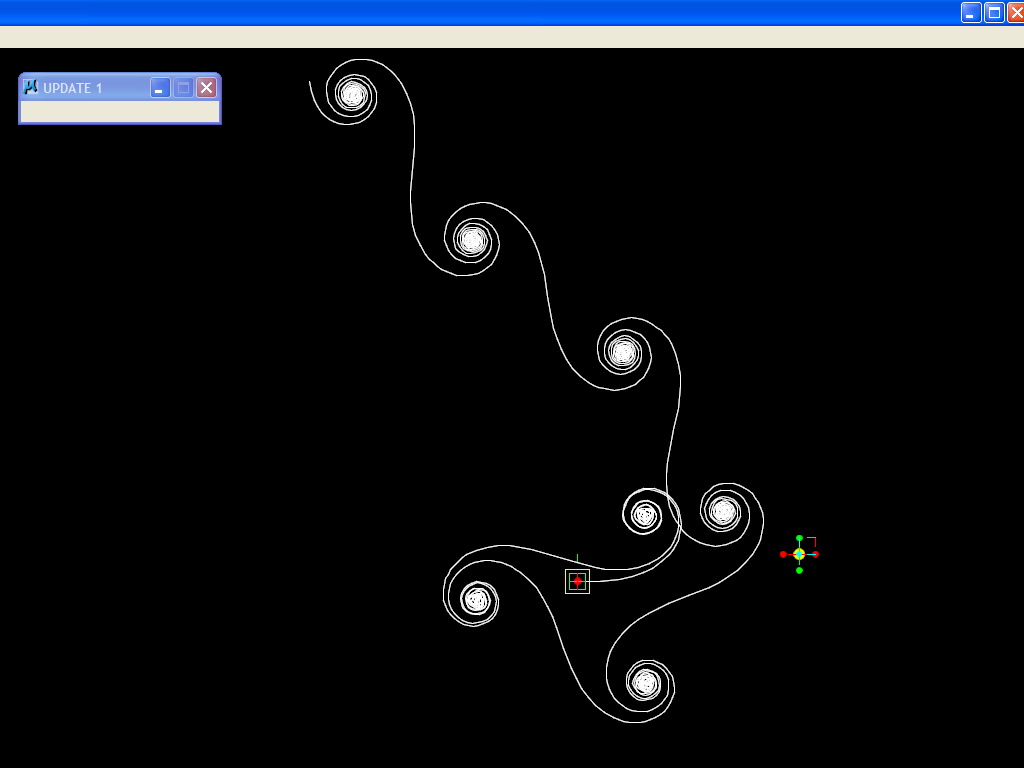

Thanks a lot Lorenz!

2009-03-30

Explaining the five cases of elastic bending

At the moment, this is how I would explain the geometry of the 5 cases of elastic bending (see previous post):

Case #1 This one follows the elastica curve, which means the curvature varies with the sin of distance along the curve (explanation here). The curve equals half a cycle of Sin (180 degrees) which means the curvature will be zero at start point and endpoint.
[EDIT 2010-06-13] This case probably involves the Cornu spiral (clothoid), see here and here.

Case #2 This is probably* a part of a clothoid curve (Cornu spiral). Curvature is maximum at the clamped end and zero at the loose end. There is a linear change in curvature in between. (A loose end cannot store any bending energy and the curvature there must be zero).
*(This could possibly be simply half an elastica curve, but I find that less likely).

Case #3 This is a circle (cylinder). Curvature is constant along the curve.

Case #4 This is a helix. Curvature is constant along the curve and there is also a constant twist. This could also be called a cylindrical plank line, which means it has the shape of a thin (straight) strip that has been wrapped around a cylinder.

Case #5 This is a conic plank line, which means it has the shape of a thin (straight) strip that has been wrapped around a cone.

Five cases of elastic bending

I have so far identified five cases of elastic bending in a thin strip:


Case #1
Two loose ends pushed together (2d).


Case #2
One clamped end, the loose end is pushed (2d).

 Case #3
Both ends clamped together to form a loop (2d).


Case #4Both ends clamped to form a loop, but with a distance sideways between endpoints (3d).

Case #5Both ends clamped and twisted to form a loop (3d).


"Conic plank line"


I would like to introduce the term "Conic plank line". (See these images).
The meaning being what I have earlier described as "Cone strip" or "Wrapping a cone with a straight strip".

2009-03-09

Loop comparison. Investigation completed?

I hesitated for some time before I compared the new Grasshopper-generated Cone Strip with the original digitized saw blade surface. It took some fine tuning of the "Cone Angle" parameter and some scaling+rotating to find the corresponding shape.
After having compared the two surfaces closely I have found that they are almost identical!
Please download the 3d-model (rhino .3dm-file) and have a look for yourself.

Well, this pretty much concludes my investigation I think! You are welcome to prove me wrong!
Thanks for your interest in this blog!
Mårten

2009-03-08

Single curved Cone Strip

This time it's single curved...


Download GHX-file.

More cone testing


Generating the cone plank line directly in Grasshopper (no ToyCar). The strips turn out slightly double curved. Why? Probably because the surface is a loft between lines that are perpendicular to the plank line curve (they shouldn't be, they should all point towards the tip of the cone and vary in length).

2009-03-02

Collar on the cone

Today I discovered that the loop I have been trying so hard to understand may in fact be a part of a cone!
The loop sits like a collar on the cone.

The loop photographed from the cone focal point.

This is a bit of a breakthrough! It's interesting that such a simple paper model can be so useful. In CAD, how would you constrain a straight strip to follow the shape of a (developable) cone?

2008-11-03

Generative components

 With GenerativeComponents (GC) I tried to mimic bending in 3d.

This shows an attempt to generate cornu spirals in GC. Not quite right - but beautiful!

Here I used scripting in GC to get a twisting strip.

Bending in 3D

 So far, most examples have been 2d-curves, but what happens when you bend in 3 dimensions.

I made a 3d loop with the saw blade and scanned it with a Microscribe 3d digitizer. Download 3dm-file here.